A price checker app should start with a photo of the exact item in your hand, then look at current public listings. That is different from a barcode scanner built for shop-shelf retail prices. How Much Is It Worth identifies the item, shows a listed range when we find enough asking prices, and labels a rough estimate when the match is thin.
The app scans faster, keeps a history of your items and gives free weekly scans.
Example scan
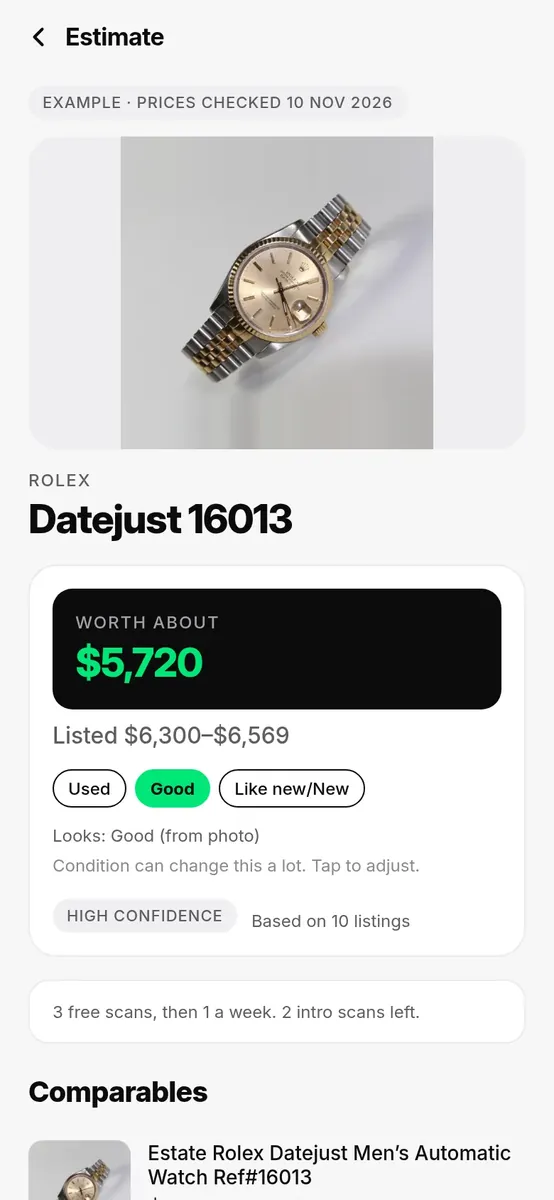
A photo check in the How Much Is It Worth app
The app identifies the item, then shows a Worth about figure and a listed range when it finds enough current listings
This screenshot is from our own price checker app, showing a vintage Datejust 16013 scan. You confirm the identification first, then we look at current public listings rather than inventing a single number. In-app example from How Much Is It Worth. See also photo credits.
What this tool does
You photograph an item, or more than one side of it. The app tries to identify it: a coin date, a card set, a hallmark, a model label, or another useful mark. Then it looks up a Worth about figure and a listed range when we find enough current public listings. Those listings are asking prices, not a sold-price database. If listings are thin or the identification is only a first pass, we label a rough estimate rather than inventing a precise number.
You can start with a free web scan on this site today. The iPhone app is on the App Store. The Android app is coming soon. The web scan is one scan per day per connection. See How we price for the short version of that process.
Photo check vs barcode price checkers
A lot of “price checker app” results are barcode tools. Those are useful when you are standing in a shop with a packaged product that has a standard code, and you want a current retail or comparison-shop figure. They are a poor fit for a coin from a jar, a trading card, a hallmarked chain, or a used console with no barcode on the thing itself.
A photo check is built for those unique or unpackaged objects. The useful details are the date, the set code, the hallmark, or the model label, not a shop SKU. We do not claim to replace a supermarket barcode lookup, and we do not claim to show a confirmed sold price for every item. Asking prices can sit above what a piece finally sells for.
When to use the app
Use a photo scan when you have an object in front of you and you want a current selling picture: coins and banknotes, trading cards, gold and silver, jewellery, watches, stamps, everyday collectibles, and some electronics. If you already know the category, the guides under coins, cards, collectibles, gold and silver, and electronics go deeper. If you are still thinking through what “worth” can mean, start with What is it worth? or the homepage scan.
Do not treat a first-look estimate as a formal appraisal, an insurance valuation, or an offer from us to buy the item. For a high-value or legally sensitive piece, get a professional opinion as well as a scan. The app can draft a listing for eBay, Facebook Marketplace, or Gumtree when you are ready to sell.
Scan and list
- Photograph the item so the useful marks are sharp, and add a second angle if you have one.
- Confirm the identification if anything looks off.
- Review the Worth about figure and the listed range when we find enough current public listings, and read a rough-estimate label when we use one. See How we price.
You can start with a free web scan in the box on this page.
The app scans faster, keeps a history of your items and gives free weekly scans.
What makes How Much Is It Worth different
One photo is enough to start, and you can add up to two more angles. We identify the item first, you confirm or correct it, then we look up a Worth about figure and a listed range from current public marketplace listings. Those are asking prices, which can sit above what a piece finally sells for. You see the listings themselves when we find enough of them.
Coins and banknotes also draw on Numista. Trading cards use PokéWallet, with a source credit where that data appears. Gold and silver use a live metal price as a floor. If listings are thin, we show a clearly labelled rough estimate rather than inventing a precise number. The app can draft a listing for eBay, Facebook Marketplace, or Gumtree once you are ready to sell. For the short version of this process, read How we price.
FAQ
Can I take a picture and find out the price?
Yes. Photograph the item, confirm the identification if anything looks off, and we will look up a Worth about figure and a listed range when we find enough current public listings. That is a photo check of the object in your hand, not a barcode scan of a shop-shelf product.
Is a price checker app the same as a barcode scanner?
Not necessarily. Many price-checker apps are built for barcodes and retail comparison shopping. How Much Is It Worth starts with a photo of a unique or unpackaged item, such as a coin, a card, or a hallmarked piece, then looks at current public listings.
Are the figures sold prices?
The listings we use are asking prices: what a seller hopes to get. A sold price can be lower. We are not a sold-price database. If listings are thin, we label a rough estimate rather than inventing a precise number.
Is the app available to download?
The iPhone app is on the App Store. The Android app is coming soon. You can also use the free web scan on this site, one scan per day per connection. See How we price for the short version of how a figure is built.
Related guides
Sources
- How the app prices items is described on How we price.
Updated 11 November 2026. Written by Harris, who built How Much Is It Worth. Figures that we cite include a source and a date. They are not a certified appraisal. See How we price.
The app scans faster, keeps a history of your items and gives free weekly scans.
See all guides on the homepage, or read how we price.